When you’re hurt during a GTA VI mission, use Zombix from the loadout wheel for quick recovery. On the default PS5 layout, hold L1 and press Square when the heal prompt is shown. Check the button displayed next to the bottle if you use a different layout.
Use Zombix during a fight
The game introduces Zombix during Gone Fishing. Pick up the bottle when the mission points it out. Open the loadout wheel and look for the red bottle with a heart and its item count. If you have a dose, use the heal prompt while you still have time to recover. VGC’s walkthrough and All Things How’s PS5 capture both show L1 plus Square. Xbox players can use the on-screen loadout prompt for their scheme or consult Project VI’s controller guide.
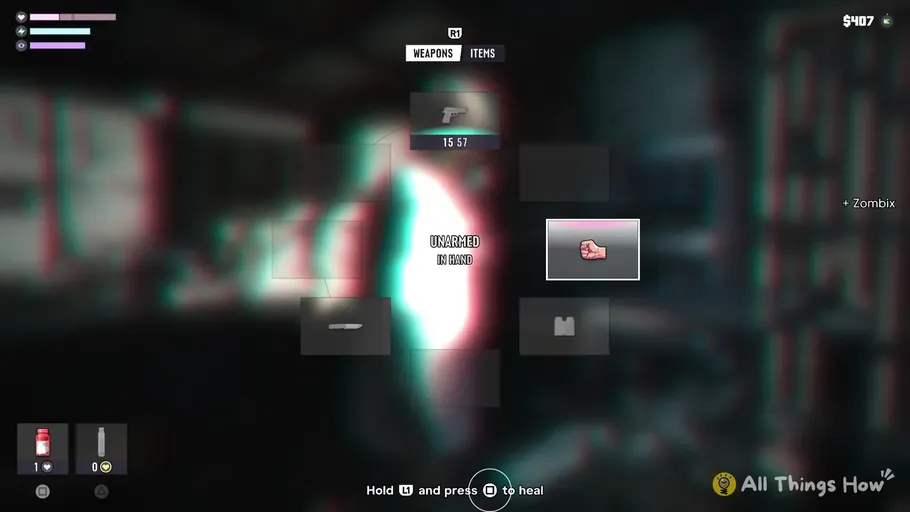
*The bottle icon and heal prompt are visible in this All Things How gameplay capture.*
If you open the wheel and the bottle is empty, look for a pickup during the mission or get out of immediate danger. Between missions, the game’s Recovering Health help screen points to local grocery stores for restocking Zombix. You can also find individual bottles while exploring.
Recover between missions
The same Help screen says health regenerates partway on its own. Use certain food or drinks, Zombix, or sleep at a safehouse to recover fully. Beebom’s hands-on guide also reports that shops and restaurants can provide food and drink. If you’re about to start another mission, restock the wheel while you’re still near supplies.
For longer-term improvements to health and stamina, see Project VI’s fitness and cores guide.