PlayStation Network had a disruption on Wednesday, November 18 while Grand Theft Auto VI was rolling out by region. Sony’s status page warned that some players could have trouble opening games, apps or network features, Axios reported. The outlet says the status page showed recovery by 2:30 p.m. Eastern (1:30 p.m. Central). At approximately 2 p.m. Central, Project VI checked Sony’s U.S. feed and found no active alerts for Account Management, Gaming and Social, or the PlayStation Store. Check the live PlayStation Service Status page for changes.
Second disruption after the U.S. East Coast unlock
Two independent status trackers recorded another PlayStation Network disruption beginning at about 12:34 a.m. Eastern on November 19 (11:34 p.m. Central on November 18). IsDown logged an interruption of about 24 minutes affecting Gaming and Social and its Game Streaming component. StatusGator logged a matching warning lasting about 22 minutes. Both records put the recovery just before 1 a.m. Eastern.
The incident followed GTA VI’s East Coast unlock. The cause remains unconfirmed. When Project VI checked Sony’s U.S. status feed shortly after 4 a.m. Central, it showed no active U.S. alerts for Gaming and Social, Account Management, or the PlayStation Store. If you’re still having trouble, check your region’s live service status first. If it’s clear, follow the installation and license checks below.
What players saw
AltChar independently encountered a PS5 that passed its internet connection test but failed the PlayStation Network sign-in step. That distinction matters if you’re troubleshooting on launch day. A working internet connection on the console can coexist with a platform sign-in problem. Sony’s warning covered PlayStation Network, and the cause of the disruption remains unconfirmed.
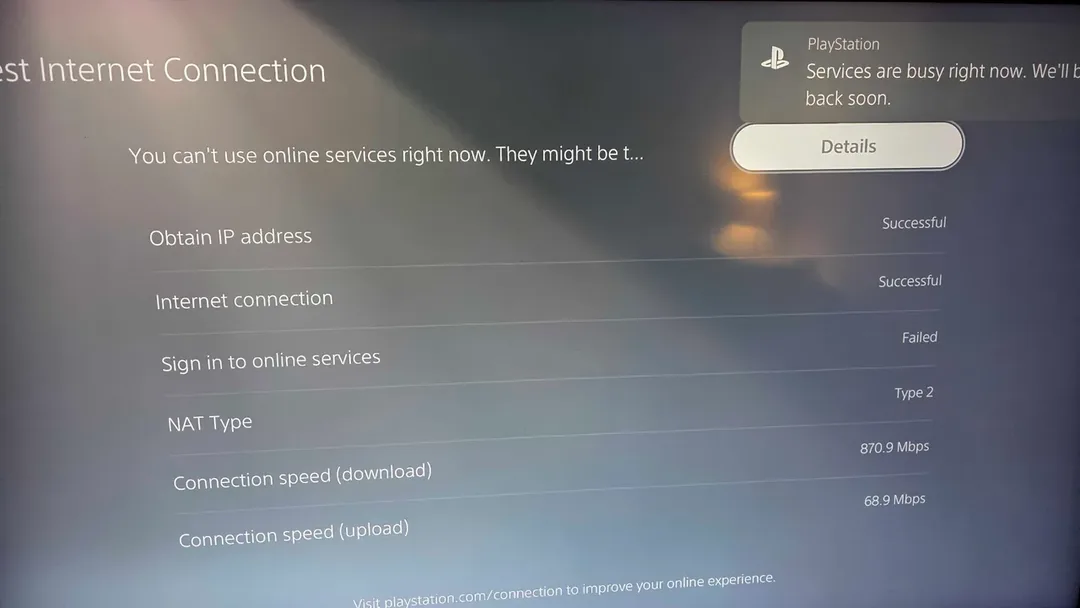
Photo: AltChar’s PS5 connection test during the November 18 disruption.
What to do if GTA VI still won’t start on PS5
1. Check the service category that matches your problem. Start with Account Management for sign-in trouble, PlayStation Store for purchase or download issues, and Gaming and Social for game or network features. Sony advises waiting for an active service alert to clear before retrying.
2. Check your unlock time and finish installing. A completed preload can still show a locked game before your regional release. Use the Project VI launch guide to check your time. If the download is stalled and there are no service alerts, open Downloads/Uploads from the control center, select the game, then pause and resume. Confirm that your console has the required PS5 system update.
3. If it’s unlocked and installed, check the license. Sign in with the purchasing account. If you use another profile on the same PS5, Sony says to enable Console Sharing and Offline Play on the account that owns the game. If you still see a padlock, go to Settings → Users and Accounts → Other → Restore Licenses and select GTA VI. See Sony’s GTA VI support guide.
New Zealand was already playing during this window. For the confirmed rollout sequence, see GTA VI’s New Zealand unlock and what follows.