If Vice City’s daytime skies lose detail or its night scenes look washed out, reopen Settings → Display → HDR Calibration in GTA VI. The screen lets you compare your settings against a logo, a bright boat scene, and a nighttime boat scene. Set up the console’s HDR output first, then use the game’s own test images. The workflow applies to PS5 and PS5 Pro with an HDR display.
Set up HDR on the console
On your PS5, open Settings → Screen and Video → Video Output. Set HDR to On When Supported. On the same screen, choose Adjust HDR and follow the prompts on the TV or monitor you’ll play on. PlayStation’s instructions cover both settings. If the console reports that HDR is unavailable, check whether the display supports HDR and whether its HDR-capable mode is enabled on that HDMI input.
Adjust GTA VI’s three sliders
Pause GTA VI, open Settings → Display, check that HDR is on, and choose HDR Calibration. All Things How’s PS5 captures show the three sliders and the on-screen controls.
| Slider | What to look for |
|---|---|
| Max Brightness | Use the logo prompt as a starting point. On the boat scene, check whether you can still see detail in clouds, reflections and white surfaces. |
| Black Levels | Check the nighttime sample. Keep dark areas dark while retaining detail you can use to see the scene. |
| Paper White | Adjust how bright ordinary whites and midtones look for your display and room lighting. Recheck both test scenes after changing it. |
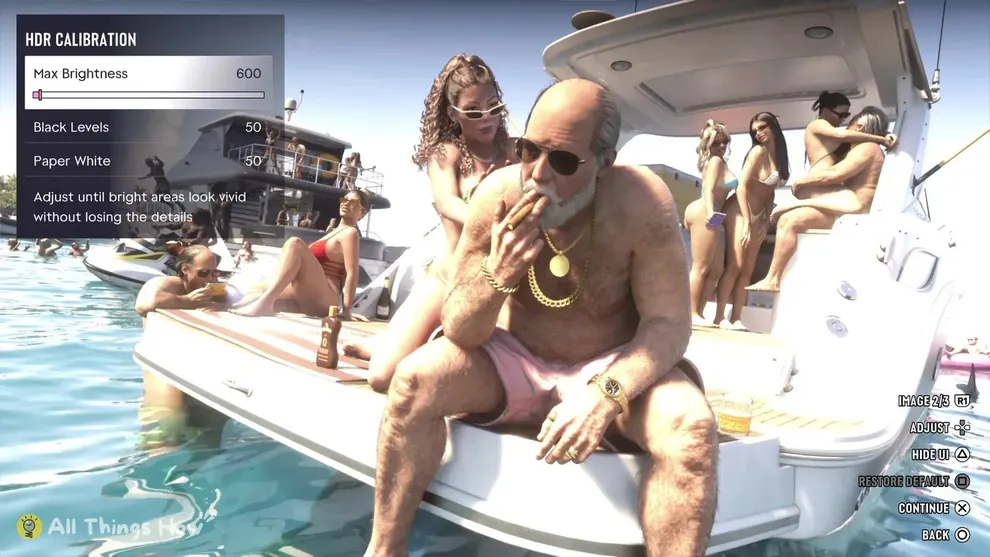
*The daylight calibration screen as captured by All Things How. Calibrate against the test images on your own display.*
On the captured PS5 menu, R1 cycles the test images, Triangle hides the sliders so you can see the full frame, and Square restores the currently selected slider’s default. Use Cross to continue after checking the dark and light scenes. Your display and room lighting determine whether a setting looks right.
For motion blur, subtitles and readability, see Project VI’s accessibility guide. For the hardware differences between PS5 and PS5 Pro, see our console performance coverage.