If you lose or drop a weapon you own in GTA VI, look for the green Weapon Locker in an Ammu-Nation. It lets you equip previously purchased weapons again and choose which ones to keep in your personal vehicle’s trunk. GamesRadar+’s hands-on guide and Game Secret’s weapon guide document how the menu works.
Find your owned weapons
1. Go to an Ammu-Nation with a weapon locker and approach the green cabinet. Some shop variants have a different setup, so look for a locker interaction prompt.
2. Use Manage Weapons when the prompt appears. GamesRadar+ captured Triangle on PS5 and lists Y on Xbox for this interaction. The separate Loadout prompt opens the carried-gear view.
3. Choose the owned weapon and follow the equip prompt. A weapon picked up temporarily may disappear from your inventory when you lose it. Start with the owned list if you’re unsure whether you bought it.
PowerPyx also caught this interaction in Pick Up a Gun, where the objective at Gellhorn Outfitters can be completed by buying a weapon or retrieving one you own from the locker.
Set up your trunk before leaving
In the locker menu, use Square on PS5 or X on Xbox to toggle the highlighted weapon in or out of the personal vehicle’s trunk. Check the labels after you make the change. At the car, open the trunk to access the gear you assigned there.
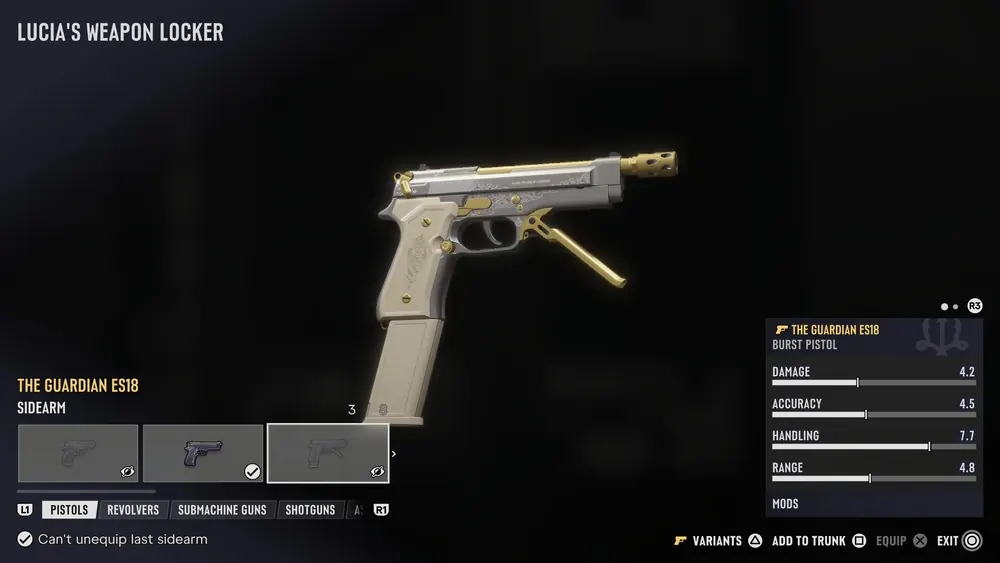
*The Add to Trunk prompt appears along the bottom of GamesRadar+’s in-game capture.*
If your car is missing, see how to register or recover a personal vehicle. For other items you can keep in the trunk, see Project VI’s fuel and storage guide.