You can start registering personal vehicles when you meet Moses in Chapter 2. Bring a vehicle without a tracker to his Port Gellhorn garage for the first registration. PowerPyx’s mission walkthrough shows what Moses checks and where the registration prompt appears.
Register your first car with Moses
1. Start Moses: Take a Vehicle to Moses in Chapter 2.
2. Find a vehicle and scan it with WAiNK. Hold Up on the D-pad to open the scanner, then aim at the vehicle and hold R1 on PS5 or RB on Xbox. Read the tracker field before taking the car to the garage.
3. Bring an untracked vehicle to Moses. During the mission, use Respray to change its color, then choose Register. If he turns you away over a tracker, return with another car.
4. Check that the garage lists it as registered. This becomes Lucia’s personal vehicle.
Later, Pay ’n’ Spray shops also offer registration. The shop menu shows the price before you confirm. PowerPyx’s ownership guide reports that Standard Tracker registration becomes available in Chapter 3. If a shop rejects a tracker or you run out of slots, advance the story or check garage capacity before spending money on another car.
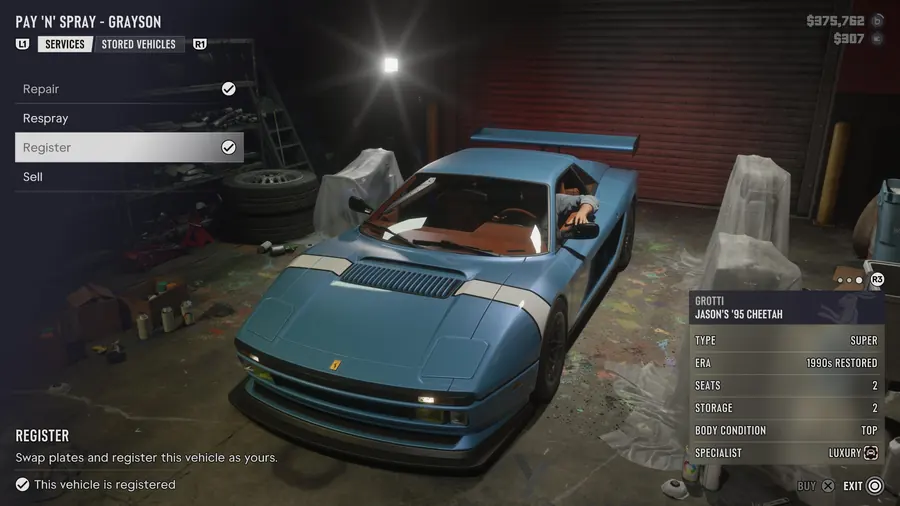
*The registration menu at a Pay ’n’ Spray, captured by GamesRadar+. The initial registration happens at Moses’s garage.*
Switch cars or recover your ride
With additional garage space you can store more registered cars or bikes. Open ScooterBros on the iFruit to request a stored ride or recover a damaged registered vehicle for a fee. GamesRadar+ documents the app and recovery flow. Check the phone guide for the shortcut, and the vehicle storage guide before transferring gear to a different trunk.
For the app unlock, garage prices, and the Little Boxes trophy, see how to buy GTA VI garages.