GTA VI uses WAiNK to log vehicles and binoculars to study wildlife. You can add discoveries as you play through the story. The 100% completion checklist calls for 200 base vehicle models and 100 animal entries as separate goals. PowerPyx and Duuro Plays document the two interactions.
Scan vehicles with WAiNK
1. Hold Up on the D-pad to open the scanner from free roam.
2. Point the phone at a nearby vehicle and hold R1 on PS5 or RB on Xbox until the scan completes. Use the prompt if you changed your controller layout.
3. Open Progress → Vehicles to check what you’ve logged. Scan road vehicles, boats, and aircraft to find more distinct models. Standout variants have separate entries, so prioritize base models for the completion target.
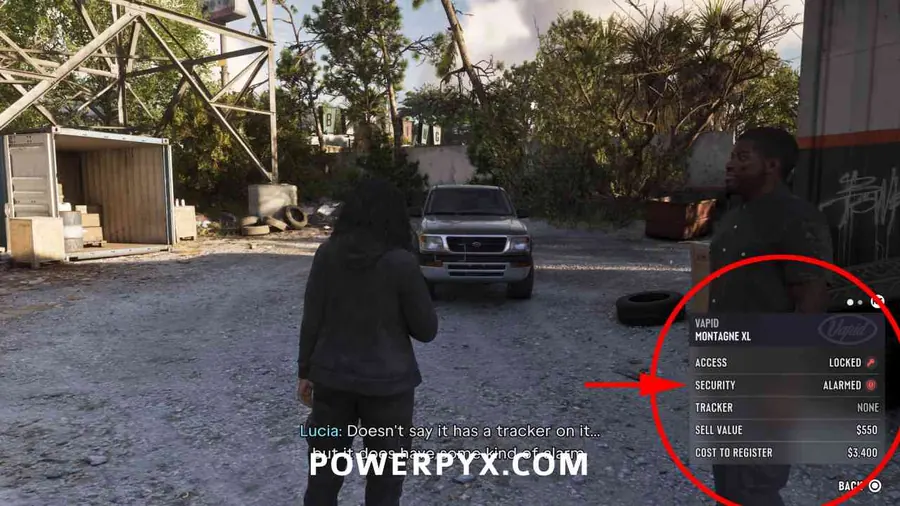
*PowerPyx’s Moses walkthrough shows a WAiNK readout with the tracker details highlighted. Use that field if you’re planning to register a vehicle.*
Study an animal with binoculars
1. Equip binoculars from the weapon wheel.
2. Frame the animal and zoom in with Up on the D-pad.
3. Hold R1 on PS5 or RB on Xbox when Study appears. Look under Progress → Animals to check the entry.
Dogs and cats are worth checking when you’re in town because their breeds can count separately. Try wetlands and rural areas when you want to find different species. You can log an animal by observing it. Hunting is a separate activity, as GTABase’s completion guide explains.
For landmarks and other points of interest, see how to collect WAiNK location scans. That target has its own counter in Collections.