GTA VI tracks WAiNK location scans separately from vehicle scans and animal studies. You need 100 locations for the You WAiNKer! trophy or achievement and the 100% completion checklist. PowerPyx’s location guide and Push Square’s landmark guide explain how the game groups these scans.
Scan a location
1. Watch for a nearby WAiNK scan notification as you explore. You may also feel a controller vibration or hear a cue.
2. Hold Up on the D-pad to open WAiNK. Look for the starburst icon around the landmark or object.
3. Point the scanner at it and use R1 on PS5 when the scan prompt appears. Use the displayed input for your control scheme.
4. Open Progress → Collections → WAiNK Locations. The subcategories let you check whether the game logged the find.
Two landmarks to start with
- Gellhorn Fun Fair. Head to Shore Drive in Port Gellhorn, north of Oyster Point Gas Stop, and scan the old Ferris wheel.
- Downtown Periscope. Look near Catalan Boulevard in Downtown Vice City. Use the WAiNK icon to line up the scan when you reach the site.
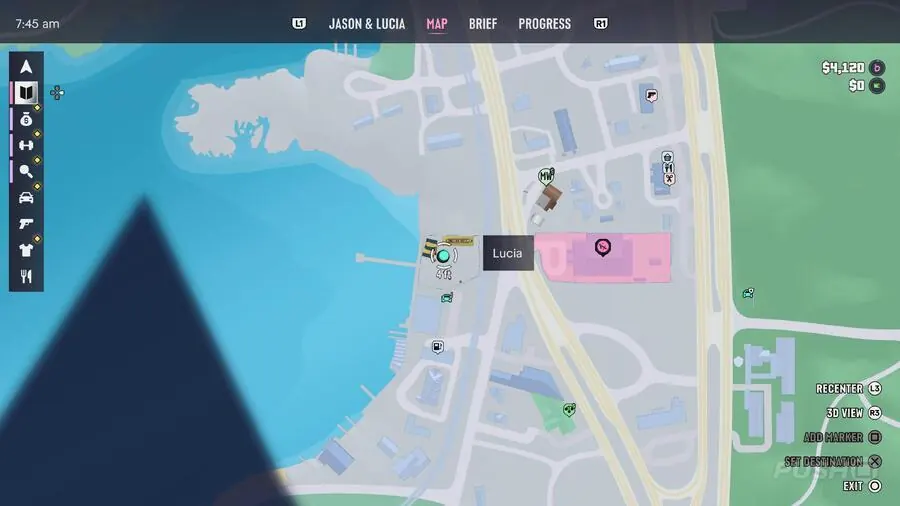
*Push Square’s Gellhorn Fun Fair map and gameplay captures show the location and the wheel to scan.*
What goes toward the 100
Use the WAiNK Locations collection as the deciding list. Landmarks, curiosities, sculptures, and No Flusher Tags are examples. Look for the tags on the ground near utility markings. AHOL Street Art and 1010 Murals are recorded in their own collections even though you use the same scanner. Those two collections do not add to the 100 locations, according to PowerPyx. If your total looks low, check which submenu gained the entry.